症状 :
点击“立即更新”后,EonOne 防病毒时间不会更新。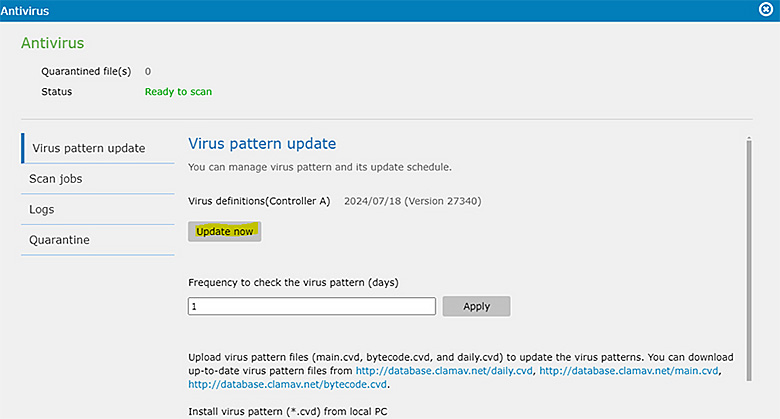
诊断 :
出现此问题的原因是需要设置路径 (文件夹) 来保存防病毒数据库。如果未指定此路径,则不会更新日期。
解决方案 :
- 转到设置 > 应用 > 已安装 > 杀毒 (设置)。
- 选择用于保存防病毒数据库的文件夹。
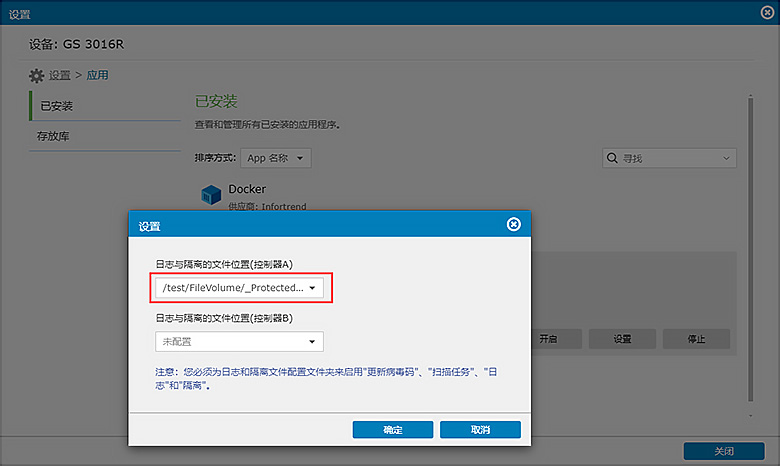
通过设置杀毒数据库的保存路径,点击“立即更新”后,更新时间将正确显示。
We use cookies on this website. To find out more about cookies and how they are used on this website, see our Privacy Policy.
By clicking ‘Continue’, you hereby agree with our use of cookies.

