We use cookies on this website. To find out more about cookies and how they are used on this website, see our Privacy Policy.
By clicking ‘Continue’, you hereby agree with our use of cookies.

常见问题解答

为什么我的虚拟机无法在 VMware 的精简配置 VV 上正常运行?

Last modified date: Fri, 22 Nov 2024 14:24:14 GMT+8

症状

VMware 上的虚拟机无法正常运行,并且用户无法添加新的虚拟机。

诊断

当存储中的自动精简配置卷用作 VMware 数据存储时,会出现此问题。如果存储池的可用容量不足,则无法再为自动精简配置卷提供额外的空间,从而导致虚拟机出现问题。

事件

当存储池空间不足时,您可能会在系统日志中看到以下事件 :

Error 2024-09-29 15:01:28 0x22160038 NAME:Partition 1 ID:0B38CD701E036A05 
Insufficient free space for data allocation (slot A)
解决方案

要解决此问题,请删除一些虚拟机释放数据存储中的空间。然后,使用 VMware 的回收功能恢复未使用的空间。这会让存储的自动精简配置卷重新获得空间,从而使虚拟机能够正常运行。
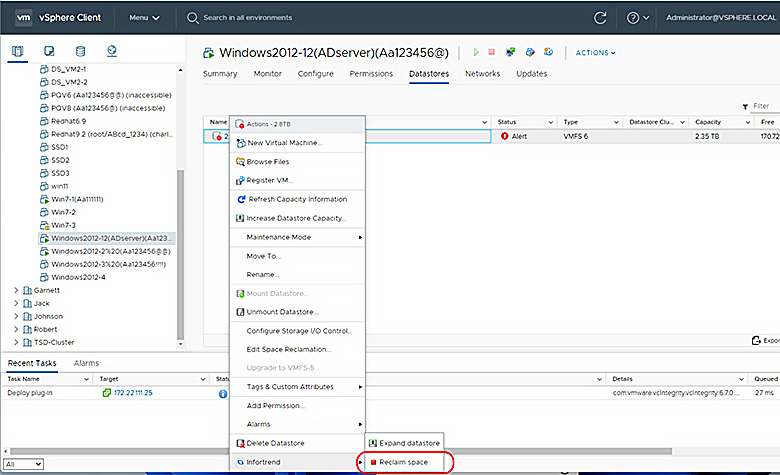
enabling the virtual machines to operate normally

本文对您有帮助吗? |

Thank you for your feedback!

Do you have any other feedback for this article?

{{ vm.showErrorMessage }}