问题描述 :
无法对 WORM 卷中的共享文件夹设置用户权限。
诊断 :
由于 WORM (一写多读) 是一种在写入数据后限制更改的技术,如果您创建的共享文件夹超过文件自动锁定时间,它将变为只读。因此,无法修改文件夹的用户权限。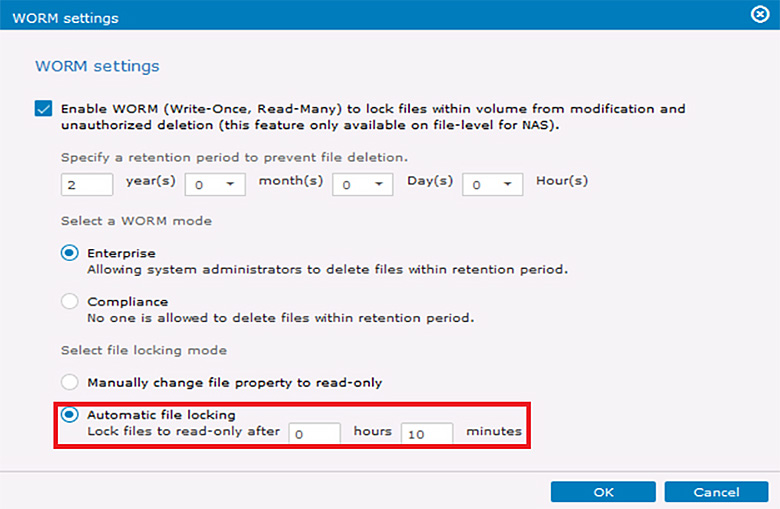
解决方案 :
如果您不再需要卷中的数据,请导航到“设置 > 存储配置 > 卷 > 更多 > 删除卷”以删除卷。如果仍然需要数据,请使用存储池中的剩余空间创建新的 WORM 卷,然后将数据移动到此卷。安全传输数据后,您可以删除原始卷。
We use cookies on this website. To find out more about cookies and how they are used on this website, see our Privacy Policy.
By clicking ‘Continue’, you hereby agree with our use of cookies.
Last modified date: Thu, 24 Oct 2024 15:58:58 GMT+8
无法对 WORM 卷中的共享文件夹设置用户权限。
由于 WORM (一写多读) 是一种在写入数据后限制更改的技术,如果您创建的共享文件夹超过文件自动锁定时间,它将变为只读。因此,无法修改文件夹的用户权限。
如果您不再需要卷中的数据,请导航到“设置 > 存储配置 > 卷 > 更多 > 删除卷”以删除卷。如果仍然需要数据,请使用存储池中的剩余空间创建新的 WORM 卷,然后将数据移动到此卷。安全传输数据后,您可以删除原始卷。

