We use cookies on this website. To find out more about cookies and how they are used on this website, see our Privacy Policy.
By clicking ‘Continue’, you hereby agree with our use of cookies.

常见问题解答

为什么我无法接收 SMTP 通知?

Last modified date: Thu, 24 Oct 2024 15:57:24 GMT+8

症状 :

尽管没有明显的网络或服务器端问题,但无法接收 SMTP 通知。

诊断 :

要使 GS 系统能够与外部网络和服务器进行 SMTP 通知通信,指定用于这些通信的接口至关重要。这可以是管理端口,也可以是任何可用的文件级数据端口。

解决方案 :
  • 配置默认路由 :
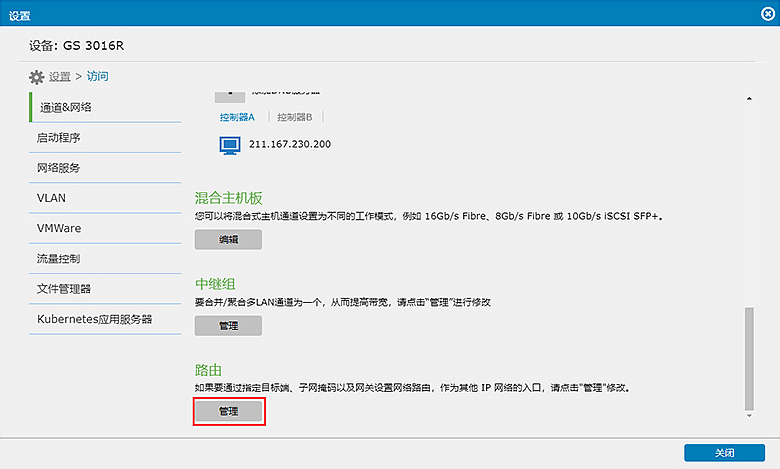
    确保在 GS 系统上正确配置默认路由,启用 SMTP 通知。请按照下列步骤操作 :
    1. 导航到 GS 系统的管理界面。
    2. 查找默认路由配置子菜单。
  • 选择路由接口 :
    1. 选择用于路由 SMTP 通知的管理端口或文件级数据端口。
    2. 配置所选接口确保连接到外部 SMTP 服务器。
  • 确认 :
    1. 配置默认路由后,测试 SMTP 通知功能。
    2. 确认系统现在可以成功发送和接收 SMTP 通知,而不会出现任何问题。

configuring Default Routing

本文对您有帮助吗? |

Thank you for your feedback!

Do you have any other feedback for this article?

{{ vm.showErrorMessage }}