We use cookies on this website. To find out more about cookies and how they are used on this website, see our Privacy Policy.
By clicking ‘Continue’, you hereby agree with our use of cookies.

常见问题解答

何时可以使用控制器上的两个数据端口访问管理 UI?

Last modified date: Fri, 22 Nov 2024 14:23:48 GMT+8

症状

在双控制器设置中,您会注意到,在某些情况下,两个数据端口 IP 地址都允许访问管理 UI。您想知道何时以及为什么会发生这种情况。

诊断
  • 正常操作 (控制器 A 主控制器、控制器 B 辅控制器) :
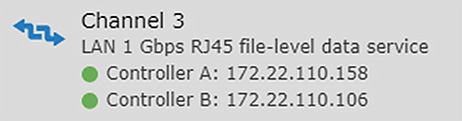
    在正常情况下,管理 UI 进程仅在主控制器 (控制器 A) 上运行。因此,您只能通过与控制器 A 关联的 IP 地址访问管理 UI,例如 172.22.110.158.
    Normal Operation (Controller A Primary, Controller B Secondary)
  • 故障转移场景 (控制器 A 发生故障,控制器 B 成为主控制器) :
    如果控制器 A 发生故障,控制器 B 将自动接管成为主控制器。在这种情况下,控制器 B 将采用控制器 A 的 IP 地址,从而允许您通过 172.22.110.158 (现在已分配给控制器 B) 和控制器 B 的原始 IP (例如 172.22.110.106) 访问管理 UI。
    Controller B automatically takes over as the primary controller
解释

当主控制器 (控制器 A) 发生故障时,辅控制器 (控制器 B) 将接管 A 控角色,包括主 IP 地址。此时,两个数据端口 IP 都可用于访问管理 UI,因为 UI 进程将在控制器 B 上运行。

本文对您有帮助吗? |

Thank you for your feedback!

Do you have any other feedback for this article?

{{ vm.showErrorMessage }}