症状 :
以下情况会触发强制转储 (force dump) :
- 您可以 ping 同管理端口 IP,但无法访问 WebGUI。
- I/O 挂起或缓慢,但控制器仍正常运行。
- 您无法访问 WebGUI,但串行控制台可以运行。
解决方案 :
- 触发 Force Dump :
按住存储正面的服务按钮,直到白色 LED 亮起。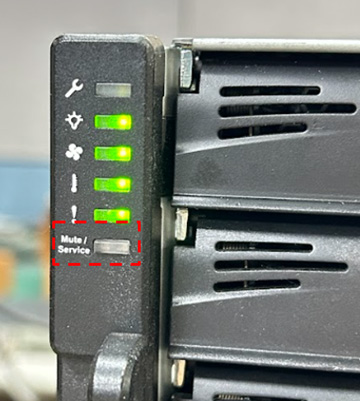
- 如果可以访问 WebGUI (EonOne) :
- 导航到 “EonOne -> 设置 -> 系统 -> 维护 -> 诊断信息 -> 系统核心转储”。
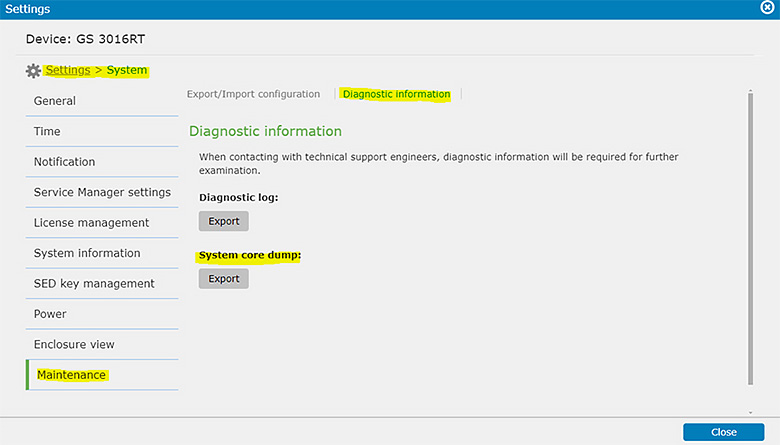
- 导出核心转储/系统信息并发送给技术支持 : Infortrend 支持。
- 导航到 “EonOne -> 设置 -> 系统 -> 维护 -> 诊断信息 -> 系统核心转储”。
- 如果您无法访问 WebGUI:
- 触发强制转储后,尝试重新启动存储系统。
- 如果问题仍然存在,请联系 Infortrend 支持。
注意 : 此操作将覆盖之前的核心转储,因此请谨慎操作。

