症状 :
在更换内存模块之前需要卸下超级电容,或者您收到“Super Capacitor failed”错误消息,指示需要更换超级电容。
诊断 :
超级电容可能由于电源跳闸或已达到其寿命限制而损坏。
解决方案 :
- 从机箱中卸下控制器。
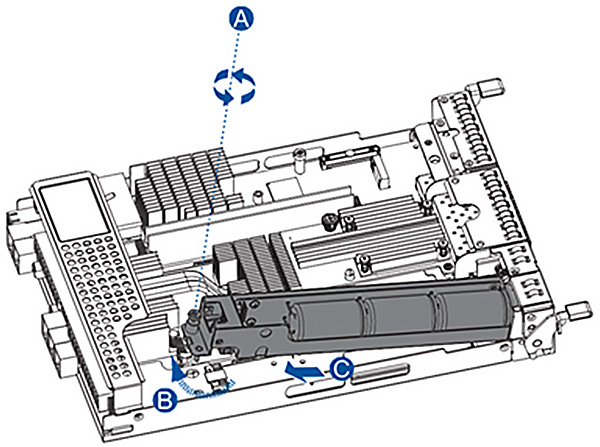
- 移除超级电容 :
- 松开将超级电容固定到控制器 (A) 的螺钉。
- 将超级电容提起 45° 角 (B)。
- 拉动超级电容从控制器 (C) 中卸下。
- 安装替换的超级电容 :
- 将替换的超级电容器连接到控制器。
- 拧紧螺丝固定就位。
- 将控制器重新插入机箱。
We use cookies on this website. To find out more about cookies and how they are used on this website, see our Privacy Policy.
By clicking ‘Continue’, you hereby agree with our use of cookies.
Last modified date: Fri, 22 Nov 2024 14:23:53 GMT+8
在更换内存模块之前需要卸下超级电容,或者您收到“Super Capacitor failed”错误消息,指示需要更换超级电容。
诊断 :
超级电容可能由于电源跳闸或已达到其寿命限制而损坏。

