We use cookies on this website. To find out more about cookies and how they are used on this website, see our Privacy Policy.
By clicking ‘Continue’, you hereby agree with our use of cookies.

常见问题解答

如何更换 GS 内存模块?

Last modified date: Fri, 22 Nov 2024 14:23:52 GMT+8

症状 :

内存模块有故障,或者您收到 HQ 更换内存模块指示,但不确定如何继续。

解决方案 :
  • 从机箱中卸下控制器。
    对于双控制器系统,请首先确定内存模块故障的控制器。
  • 从控制器上拆下超级电容器。
    有关详细说明,请参阅“更换超级电容”。
    重要 :
    1. 确保执行此步骤以防止超级电容会放电,这可能会损坏 DIMM 和通道板。
    2. 或者控制器 7 段 LED 熄灭后至少等待 30 秒。
  • 找到控制器中的 DIMM 插槽。
    有关确切的位置信息,请参阅每个型号的“硬件手册”。以下示例可能因型号而异。
    重要 : 安装内存模块时,优先安装 CH0 DIMM1 和 CH3 DIMM1 插槽。
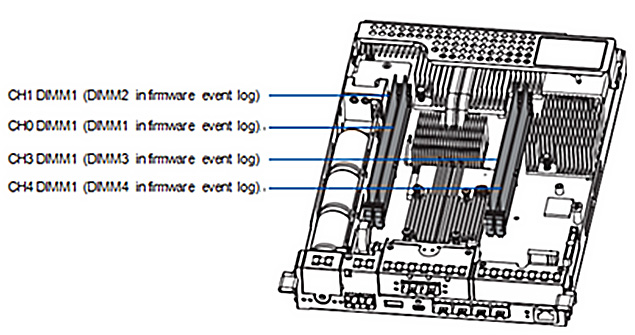
    fill the CH0 DIMM1 and CH3 DIMM1 slots first
  • 卸下有故障的 DIMM。
    按下夹子,从 DIMM 插槽中释放 DRAM 模块。
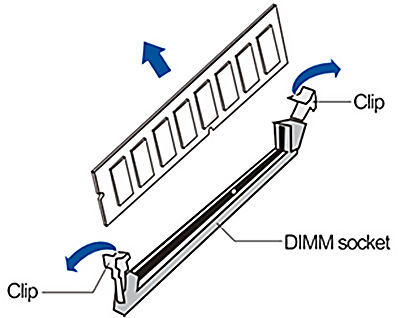
    Push down the clips to release the DRAM module from the DIMM socket
  • 安装替换的 DIMM。
    小心地将替换的 DIMM 插入插槽,确保 DIMM 的凹槽与插槽上的凸起对齐。
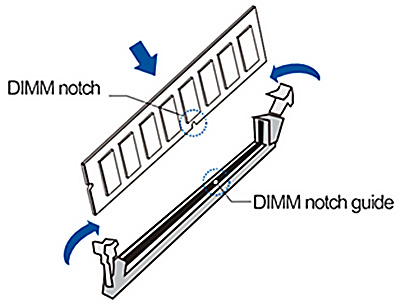
    Carefully insert the replacement DIMM into the socket
  • 将控制器重新安装到机箱。

本文对您有帮助吗? |

Thank you for your feedback!

Do you have any other feedback for this article?

{{ vm.showErrorMessage }}