症状
无法使用非管理帐户加入 AD 服务器。
诊断
该问题与 AD 服务器中的权限设置有关,无法从 GS 端解决。
解决方案
在 AD 服务器中为帐户设置必要的权限和相关设置。请执行以下步骤 :
- 在 AD用户和计算机中 :
- 打开 Delegation of Control Wizard (控制委派向导)。
- 添加用户帐户。
- 创建要委派的自定义任务 :
- 选择“Create a custom task to delegate” (创建要委派的自定义任务)。
- 选择“only the following objects in the folder” (仅文件夹中以下对象) 并选中“Computer objects” (计算机对象)。
- 勾选“Create selected objects in this folder” (在此文件夹中创建选定对象) 和“Delete selected objects in this folder” (删除此文件夹中选定的对象)。
- 设置权限 :
在 permissions (权限) 下,选择“General” (常规) 并检查以下内容 :- “Reset password” (重置密码)
- “Read and write account restrictions” (读取和写入帐户限制)
- “Validated write to DNS host name” (已验证对 DNS 主机名的写入)
- “Validated write to service principal name” (已验证对服务主体名称的写入)
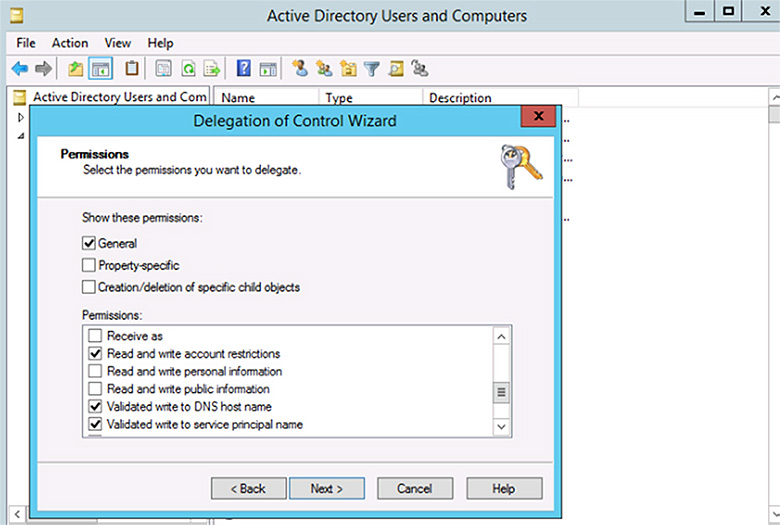
通过执行这些步骤,您可以确保用户帐户具有权限,能够成功加入 AD 服务器。

