症状 :
MFA 验证失败,并显示错误消息或提示,提示无法成功完成验证。有关错误消息,请参阅下图。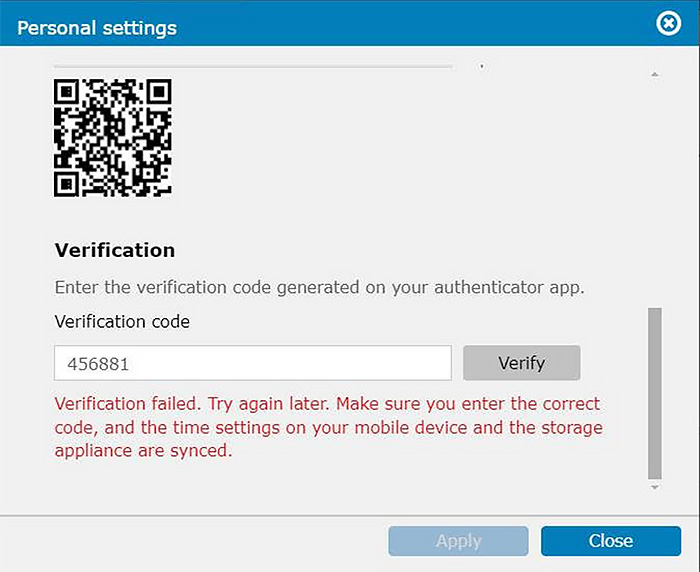
诊断 :
可能是主机设备 (MFA 正在设置) 与用于验证的移动设备之间出现时间同步的问题。
解决方案 :
如果要解决此问题,请按照下列步骤操作 :
- 调整时间设置 :
- 导航到设备的设置 : “设置 -> 时间 -> 更改日期和时间”。
- 启用“自动与 NTP 服务器同步”选项。
- 从可用选项中选择适当的 NTP (网络时间协议) 服务器。
- 点击“现在更新”可立即同步时间。
- 确认移动设备时间 :
确保便携式/移动设备 (用于 MFA 验证) 上的时间准确无误,并尽可能与同一 NTP 服务器同步。 - 时间设置路径 :
设置 -> 时间 -> 更改日期和时间 -> 自动与 NTP 服务器同步 -> 选择相应的 NTP 服务器 -> 现在更新
请参阅提供的图像,直观上获得指导,来导航这些设置并进行必要的调整。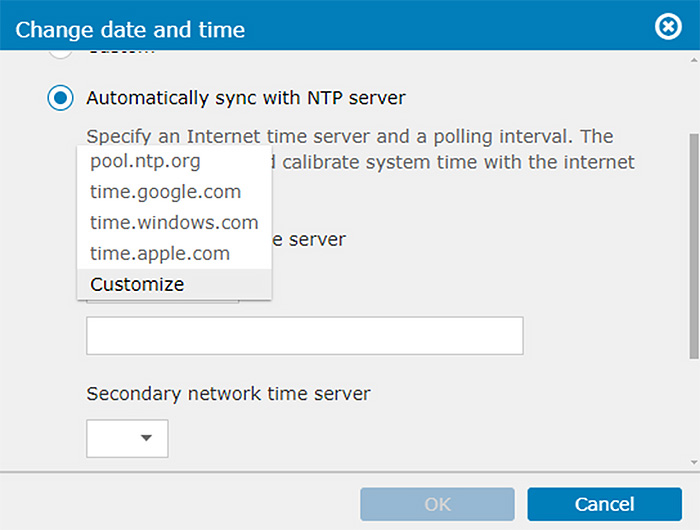
通过主机设备和移动设备都具有准确且同步的时间,来解决 MFA 验证问题。这种同步对于 MFA 的正常运行至关重要,可确保安全可靠的身份验证。

