症状
- 为了保证网络安全,部分客户环境要求不开启 SNMP。
- 在客户存储系统上漏洞扫描确定了 SNMP 服务相关的安全风险。发现的具体漏洞为 : 41028 - SNMP Agent Default Community Name (public).
诊断
SNMP 服务使用默认社区名称“public”,这可能会带来安全风险。
解决方案
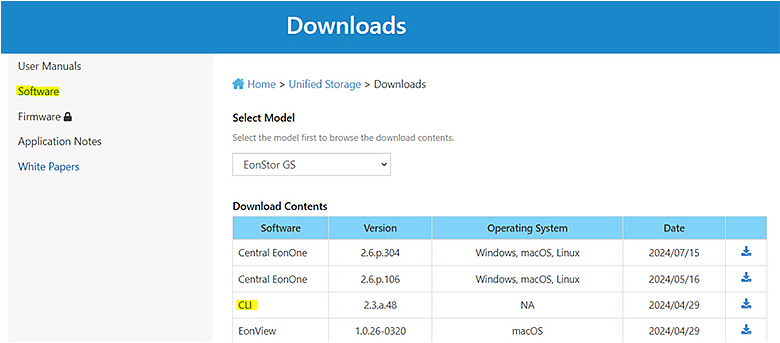
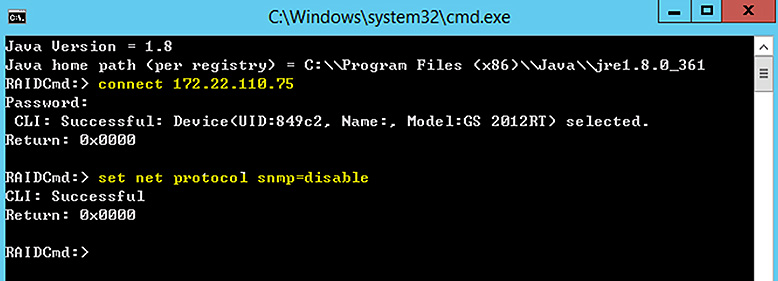
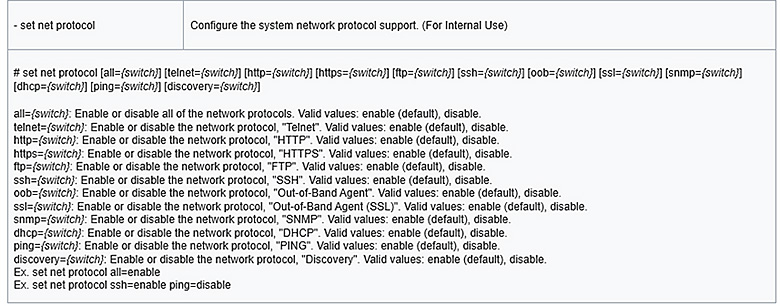
要通过 CLI 禁用 SNMP 服务,请执行以下步骤 :
We use cookies on this website. To find out more about cookies and how they are used on this website, see our Privacy Policy.
By clicking ‘Continue’, you hereby agree with our use of cookies.
Last modified date: Fri, 22 Nov 2024 14:23:50 GMT+8
SNMP 服务使用默认社区名称“public”,这可能会带来安全风险。
要通过 CLI 禁用 SNMP 服务,请执行以下步骤 :